WordPress是世界上最受欢迎的内容管理系统之一,本文以华为云服务器为例,详细介绍如何完成基础软件服务的部署,从而为WordPress搭建稳定运行环境。
一、环境准备
- 购买华为云服务器:登录华为云官网,选择弹性云服务器(ECS),根据需求选择配置(推荐至少2核4GB内存),操作系统建议选择CentOS 7.6或Ubuntu 18.04。
- 安全组配置:在安全组中开放80(HTTP)、443(HTTPS)和22(SSH)端口,确保Web服务和远程连接可用。
二、安装Web服务器(Nginx/Apache)
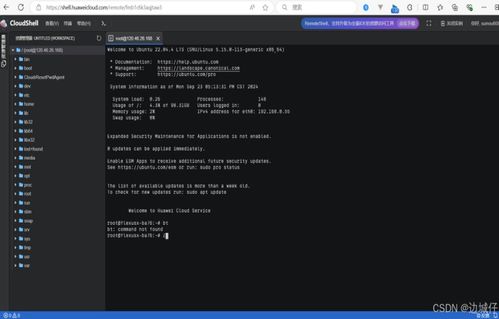
- 更新系统包:通过SSH连接服务器,执行
yum update -y(CentOS)或apt update && apt upgrade -y(Ubuntu)。 - 安装Nginx:运行
yum install nginx -y或apt install nginx -y,启动服务并设为开机自启:systemctl start nginx && systemctl enable nginx。 - 验证安装:在浏览器输入服务器公网IP,若显示Nginx欢迎页即成功。
三、安装数据库(MySQL/MariaDB)
1. 安装MariaDB:执行yum install mariadb-server mariadb -y或apt install mariadb-server -y,启动服务:systemctl start mariadb && systemctl enable mariadb。
2. 安全配置:运行mysql<em>secure</em>installation,设置root密码并移除测试数据库。
3. 创建WordPress数据库:登录MySQL(mysql -u root -p),执行以下命令:
`sql
CREATE DATABASE wordpress;
CREATE USER 'wpuser'@'localhost' IDENTIFIED BY 'your_password';
GRANT ALL PRIVILEGES ON wordpress.* TO 'wpuser'@'localhost';
FLUSH PRIVILEGES;
EXIT;
`
四、安装PHP
1. 添加PHP仓库(以CentOS为例):
`bash
yum install epel-release -y
yum install http://rpms.remirepo.net/enterprise/remi-release-7.rpm -y
yum install yum-utils -y
yum-config-manager --enable remi-php74
`
- 安装PHP及扩展:运行
yum install php php-fpm php-mysqlnd php-json php-gd php-mbstring -y。 - 启动PHP-FPM:
systemctl start php-fpm && systemctl enable php-fpm。
五、配置Nginx支持PHP
1. 编辑Nginx配置文件:vi /etc/nginx/conf.d/wordpress.conf,添加以下内容:
`nginx
server {
listen 80;
servername yourdomainorip;
root /var/www/html;
index index.php index.html;
location / {
try_files $uri $uri/ /index.php?$args;
}
location ~ \.php$ {
fastcgipass unix:/var/run/php-fpm/www.sock;
fastcgiindex index.php;
fastcgiparam SCRIPTFILENAME $documentroot$fastcgiscriptname;
include fastcgiparams;
}
}
`
- 重启Nginx:
systemctl restart nginx。
六、下载并配置WordPress
1. 安装wget:yum install wget -y或apt install wget -y。
2. 下载WordPress:
`bash
cd /var/www/html
wget https://wordpress.org/latest.tar.gz
tar -xzvf latest.tar.gz
mv wordpress/* ./
chown -R nginx:nginx /var/www/html
`
3. 配置wp-config.php:复制wp-config-sample.php为wp-config.php,编辑数据库连接信息:
`php
define('DBNAME', 'wordpress');
define('DBUSER', 'wpuser');
define('DBPASSWORD', 'yourpassword');
define('DB_HOST', 'localhost');
`
七、完成安装
在浏览器访问服务器IP,跟随WordPress安装向导填写站点信息,即可完成部署。
注意事项:
- 定期更新系统和软件以确保安全。
- 建议配置SSL证书启用HTTPS。
- 使用华为云云备份服务定期备份数据。
通过以上步骤,您已成功在华为云服务器上部署了WordPress所需的基础软件服务,为网站运行奠定了坚实基础。